POWER PRODUCTS EMISSIONS COMPLIANCE
We are committed to following emissions regulatory requirements wherever our products are sold.
FACTORY POWER PRODUCTS LABEL REQUEST
Note: Due to US Holiday schedule, label delivery may be delayed
This form is to be filled out to request engine labels for the following:
- Complete engines that ship to external customers. This would be the final EPA Emissions label.
- Export of engines out of the country from a factory. This would be an Export only label.
- After submitting a request, you will receive an email with updates on the status.
- Users should ensure that mail handling rules are set up to allow for email to come from jira@ercrequestspilotprogram.atlassian.net into their inbox.
- Please allow 5 to 7 business days for shipping of labels. Request can be made up to 30 days in advance of kit installation. See FAQs Q1 for more information or click Power Products Instructions in the menu.
- If you have any questions or concerns, please do not hesitate to contact us at emissions_compliance@progressrail.com.
POWER PRODUCTS EMISSIONS LABEL REQUEST
This form is to be filled out after an Emissions Overhaul Kit has been installed. The submittal of this form is mandatory before a label for a Marine/Power Product engine can be request.
- After submitting a request, you will receive an email with updates on the status.
- Users should ensure that mail handling rules are set up to allow for email to come from jira@ercrequestspilotprogram.atlassian.net into their inbox.
- Please allow 5 to 7 business days for shipping of labels. Request can be made up to 30 days in advance of kit installation. See FAQs Q1 for more information or click Power Products Instructions in the menu.
- If you have any questions or concerns, please do not hesitate to contact us at emissions_compliance@progressrail.com.
POWER PRODUCTS REPRINT LABEL REQUEST
This form is to be filled out if an emissions label is missing from an engine and is needing a replacement.
- After submitting a request, you will receive an email with updates on the status.
- Users should ensure that mail handling rules are set up to allow for email to come from jira@ercrequestspilotprogram.atlassian.net into their inbox.
- Please allow 5 to 7 business days for shipping of labels. Request can be made up to 30 days in advance of kit installation. See FAQs Q1 for more information or click Power Products Instructions in the menu.
- If you have any questions or concerns, please do not hesitate to contact us at emissions_compliance@progressrail.com.
FAQs
Q1 – Due to the large volume of requests received in a normal day, please consider the following when choosing a shipping method:
- UPS Next Day and 2nd Day Air is guaranteed in the US only.
- International shipments take 2 or more business days to arrive.
- United States Postal Service (USPS) shipments will take 5 to 7 business days within the US and up to 2 weeks Internationally (no tracking numbers will be provided).
- Requesters are expected to pay for shipping via UPS, or DHL carriers, please provide your account number in the provided field within the form.
- For expedited shipping, we ship via UPS and DHL. Our final pick up for the day is at 2:00 PM U.S. Central Time. Requests received after 12:00 Noon may not be shipped until the next day due to processing time.
- If you have a FedEx account, you may attach a pre-paid label as an image attachment in the portal. FedEx is not selectable as a shipping provider, but you can provide the FedEx account number and comments in the “Additional Comments” section.
Q2 – I need a label reprinted in order to ship, what do I do?
- Go to https://www.progressrail.com/en/Segments/Engines/EmissionsCompliance.html
- Select Power Products and then select Customer Power Products Reprint Label Request
- Select the Reprint button.
- Complete the required fields and click submit.
Q3 – What do I do with my old emissions label on the engine?
- Remove and destroy the previous Engine Emissions label.
- Apply the most recent Emissions certification label on the engine by following the instructions listed in the “Instructions for installation of emissions kit” ETI.
Q4 – Who needs to register the EPA Emissions Kit?
(a) If you are the engine installer, then you must:
- Go to https://www.progressrail.com/en/Segments/Engines/EmissionsCompliance.html
- Select Power Products and then select the Power Products Emissions Label Request tab or scroll down screen.
- Select the Emissions Label button.
- Complete the required fields and click submit.
(b) If you are a service provider who applies the emissions kit to the engine but does NOT install the engine:
- Go to https://www.progressrail.com/en/Segments/Engines/EmissionsCompliance.html
- Select Power Products and then select the Factory Power Products Label Request tab or scroll down screen.
- Select the Factory Label button.
- Complete the required fields and click submit.
- Allow 5-7 business days for shipping of labels. See FAQs Q1 for more information.
- Place the factory label on the engine.
- Ship to the engine installation location for the locomotive.
Q5 – When do I need to submit the final EPA labels request?
- It is recommended to submit the registration within two weeks of anticipated overhaul completion.
- Allow 5-7 business days for shipping of labels. See FAQs Q1 for more information.
- Follow registration instructions in Q5a.
Q6 – How do I find my Emissions Family to enter on the registration form?
- From the Engineering Test Instruction (ETI) provided with the emissions kit.
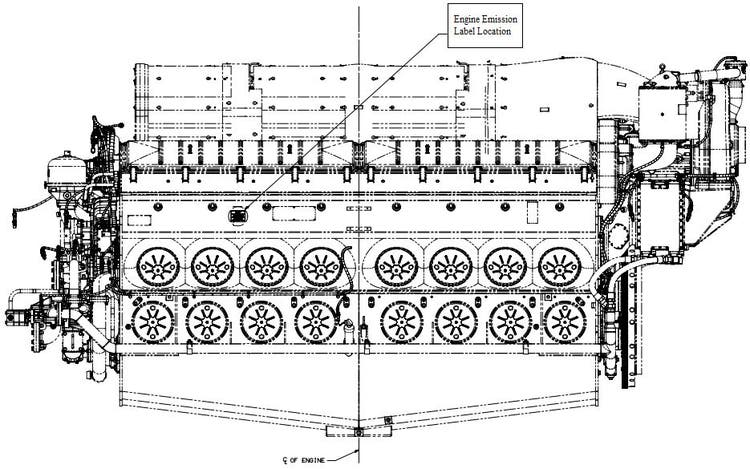
Q7 – What if I don’t know the original delivery date?
- Check your manufacturing or maintenance records.
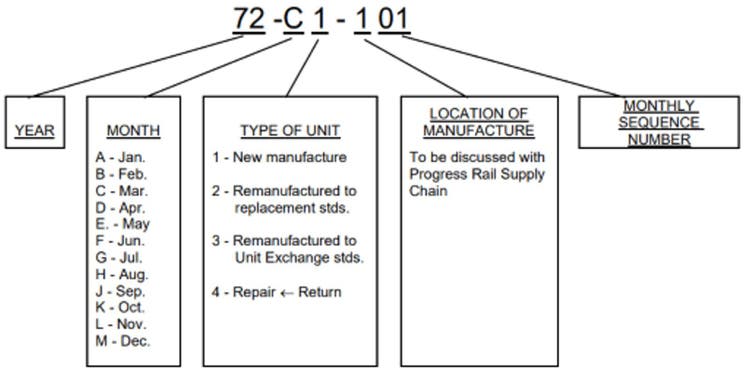
- See the serial number guidelines below: